
個人サイト:https://razor-edge.work/
Twitter:@t_awana(鍵付き)
GitHub:https://github.com/t-awana
RPGツクールMZ用プラグイン投稿・告知サイト

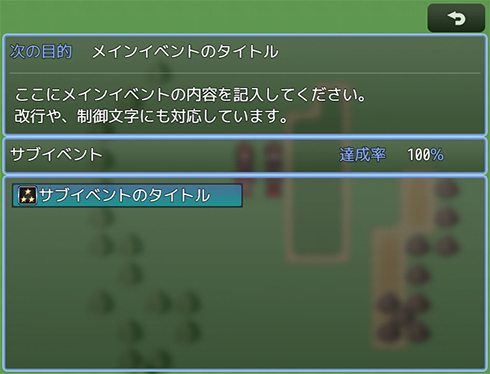
▼冒険メモ(沫那環様作) - TA_AdventureNoteMZ.js
https://plugin-mz.fungamemake.com/archives/4193
「冒険メモ」の機能を追加します。
ふりがな:てぃーえーあどべちゃーのーとえむぜっと
機能概要: 「冒険メモ」の機能を追加します。
利用規約(ライセンス): MITライセンス
作者:沫那環
作者サイト:https://razor-edge.work/
直接ダウンロード:Zipファイルダウンロードページ:https://raw.githubusercontent.com/t-awana/TA_MVZPlugin/…
ファイル名:TA_AdventureNoteMZ.js
備考:
ver.1.1にて、プラグインコマンド「冒険メモを開く」と、サブイベントの詳細表示時に、その他のウィンドウを表示するかどうかの設定を追加。
また、コードを最適化。
プラグインのヘルプ:
/*:
 * @target MZ
 * @plugindesc Add the function of "adventure note".
 * @author Tamaki Awana
 * @url https://razor-edge.work/
 * @help Add the "adventure note" function that show the next action
 *  to take in the game, and list of sub events.
 * ・Display a sentence that describes the next action to
 *  be taken according to the value of the set variable.
 * ・Display the text according to the value of the variable corresponding
 *  to the sub event in the dedicated detail window.
 * ・When sub event cleared, you can add a cleared symbol
 *  to the event list and details window.
 *
 * About Main Event:
 *  If you assign the value set in MainEventValue to the
 *  variable set in MainEventVariable, the text and title linked with
 *  the assigned value will be displayed in a dedicated window.
 *  You can switch the displayed text by changing the value of
 *  the variable as the main event progresses.
 *
 * About Sub Event:
 *  ・When the variable set in SubEventVariable in each subevent becomes
 *   the value set in SubEventStartValue or larger than that,
 *   it is determined that the event has started.
 *  ・Sub event is considered cleared when the value of the variable
 *   is greater than or equal to the value of SubEventClearValue.
 *  ・You can switch the displayed text by changing the value
 *   of the variable as you progress.
 *
 * Plugin Commands:
 *  SetStartSubEvent [ID of subevent]
 *  Set start a sub event with the setted ID number.
 *
 *  SetClearSubEvent [ID of subevent]
 *  Set clear a sub event with the setted ID number.
 *
 *  ResetAllSubEvents
 *  Resets the progress of all sub events,
 *  and sets the all sub events unstarted.
 *
 *  OpenAdventureNote
 *  Open the adventure note scene.
 *
 * Notions:
 *  There is no function to display a dedicated notification
 *  at the start / end of a sub-event.
 *  If you want to let the player know the progress of the event,
 *  please use various event commands and other plugins.
 *
 * Update History:
 * ver.1.1 Added plugin command of "Open Adventure Memo".
 *         Added a setting to display other windows
 *         when displaying the details of sub events.
 *         Code Optimized.
 * ver.1.0   Released.
 *
 * ---
 *
 * This plugin is released under MIT license.
 * https://opensource.org/licenses/mit-license.php
 *
 * This plugin is based on a RGSS2 sample script of
 *  "Rector And Black Lion Coat Of Arms"(レクトールと黒獅子の紋章)
 *  of RMVX sample game, and 回想領域's RGSS3 material
 *  "Adventure note"(冒険メモ).
 * Thanks to 回想領域(http://kaisou-ryouiki.sakura.ne.jp/) and
 *  "Rector And Black Lion Coat Of Arms".
 */
/*:ja
 * @target MZ
 * @plugindesc 「冒険メモ」の機能を追加します
 * @author 沫那環
 * @url https://razor-edge.work/
 * @help ゲーム内で次に取るべき行動や、サブイベントの一覧を表示する
 * 機能を備えた「冒険メモ」を追加します。
 * ・設定した変数の値に応じた、次にとるべき行動を記した
 *  文章を表示することができます。
 * ・サブイベントと対応した変数の値に応じた文章を、
 *  専用の詳細ウィンドウに表示することができます。
 * ・サブイベントのクリア時に、イベント一覧や詳細ウィンドウに、
 *  クリア済みのマークを付けることができます。
 *
 * 【メインイベントについて】
 *  MainEventVariableで設定した変数に、MainEventValueで設定した値を代入すると、
 *  代入された値と連動したテキストとタイトルが、専用のウィンドウに表示されます。
 *  メインイベントの進行に合わせて変数の値を変更することで、
 *  表示されるテキストを切り替えることができます。
 *
 * 【サブイベントについて】
 *  ・各サブイベントにあるSubEventVariableで設定した変数が、
 *   SubEventStartValueに設定された値、またはそれより大きくなると、
 *   そのイベントが開始されていると判定されます。
 *  ・変数の値がSubEventClearValueの値、またはそれより大きくなると、
 *   そのサブイベントはクリアされたとみなされます。
 *  ・進行に合わせて変数の値を変更することで、表示されるテキストを
 *   切り替えることができます。
 *
 * 【プラグインコマンド】
 *  サブイベントを開始状態にする [サブイベントのID]
 *  指定したIDのサブイベントを開始状態に設定します。
 *
 *  サブイベントをクリア状態にする [サブイベントのID]
 *  指定したIDのサブイベントをクリア状態に設定します。
 *
 *  全サブイベントリセット
 *  全てのサブイベントの進行状況をリセットし、開始されていない状態に設定します。
 *
 *  冒険メモを開く
 *  冒険メモを開きます。
 *
 * 【注意】
 *  サブイベントの開始時・終了時に、専用の通知を表示する機能はありません。
 *  イベントの進行をプレイヤーに知らせたい場合は、
 *  各種イベントコマンドや、他のプラグインを利用してください。
 *
 * 【更新履歴】
 *  ver.1.1 プラグインコマンドに「冒険メモを開く」を追加。
 *           サブイベントの詳細表示時に、その他のウィンドウを
 *           表示するかどうかの設定を追加。
 *           コードの最適化。
 *  ver.1.0 公開
 *
 * ---
 *
 * このプラグインは MIT License にもとづいて提供されています。
 * https://opensource.org/licenses/mit-license.php
 *
 * このプラグインを制作するにあたり、
 * RPGツクールVXサンプルゲーム
 * 「レクトールと黒獅子の紋章」の内部スクリプトの一部と、
 * 「回想領域」(http://kaisou-ryouiki.sakura.ne.jp/)の
 * RGSS3素材「冒険メモ」を参考にさせていただきました。
 * この場を借りて、お礼申し上げます。
 */
個人サイト:https://razor-edge.work/
Twitter:@t_awana(鍵付き)
GitHub:https://github.com/t-awana
Copyright© #ツクプラMZ , 2026 All Rights Reserved.